Set up your wallet and node
Before interacting with DeFi stream protocols, you need a non-custodial wallet and a reliable RPC endpoint. This setup gives you direct control over your assets and ensures your transactions reach the blockchain efficiently. Think of your wallet as your identity and your node as your connection to the network.

Select a reputable non-custodial wallet like MetaMask or Rabby. These tools allow you to manage your private keys without relying on a centralized exchange. For significant capital, consider a hardware wallet to keep your keys offline and secure.
When you create your wallet, you will receive a 12 or 24-word seed phrase. Write this down on paper and store it in a safe place. Never share it with anyone, store it digitally, or screenshot it. If you lose this phrase, you lose access to your funds permanently.
An RPC (Remote Procedure Call) endpoint allows your wallet to communicate with the blockchain. For DeFi streaming, where transactions are frequent and small, a reliable public RPC might be too slow. Consider using a provider like Alchemy or Infura to ensure your stream transactions are processed without delay.
To interact with any DeFi protocol, you need native tokens (like ETH on Ethereum or MATIC on Polygon) to pay for gas fees. DeFi stream protocols often require small, continuous payments for gas or liquidity provision. Ensure your wallet has enough native tokens to cover these costs before starting your first stream.
With your wallet secured and your node configured, you are ready to connect to DeFi stream protocols. This foundation ensures that your interactions are secure, efficient, and fully under your control.
Fund the stream with stable assets
To start a liquidity stream, you need to deposit the underlying asset that will flow to recipients over time. This is the point where protocol mechanics meet portfolio strategy. Most streaming protocols support stablecoins like USDC or USDT for predictable yield, but ETH and BTC streams are also common for capital appreciation plays.
The quality of your stream depends entirely on the quality of the deposit. Unlike a lump-sum investment, a stream is a continuous obligation. If the asset drops in value, you are still sending the same amount. If the asset appreciates, your cost basis rises. Choosing the right asset is the first and most critical decision in building modular liquidity.
Select the asset that best matches your risk tolerance and income goals. Stablecoins offer price stability, making them ideal for payroll, subscriptions, or fixed stipends. Volatile assets like ETH allow your stream to grow with the market, but they introduce significant value fluctuation. Most users start with USDC for its liquidity and regulatory clarity.
Navigate to the streaming interface and connect your Web3 wallet (e.g., MetaMask, Rabby, or WalletConnect). When you select a token to stream, the protocol will request a token approval. This allows the smart contract to pull funds from your wallet on your behalf. Always verify the contract address to avoid phishing sites.
Enter the total amount you wish to fund the stream with. This is the "principal" that will be distributed over the stream's duration. For example, to stream $1,000 over 30 days, you deposit $1,000 upfront. The protocol locks these funds in a smart contract, ensuring they are available for distribution until the stream ends or is cancelled.
Define how much flows per second, minute, or day. Streaming protocols calculate this rate based on your total deposit and the chosen duration. You can also set a hard end date or make the stream perpetual (until funds run out). Once confirmed, the stream begins immediately, and recipients can claim funds in real-time.
Configure stream parameters and recipients
Before locking in a liquidity stream, you must define the exact mechanics of the transfer. This step translates your budget into on-chain logic. The three pillars of configuration are the recipient address, the flow rate, and the total duration. Getting these right ensures your funds move automatically without requiring manual intervention.
Paste the recipient's wallet address into the designated field. Double-check the first and last four characters of the address to prevent sending funds to the wrong contract. This address determines who receives the streamed assets, so accuracy is non-negotiable.
Define how much asset is transferred per second. This is the core "streaming" logic. For example, setting a rate of 1 USDC per second means the recipient accumulates 86,400 USDC per day. Most interfaces allow you to switch between "per second" and "per month" views for easier mental math.
Choose whether the stream runs indefinitely or stops at a specific block height or timestamp. An indefinite stream acts like a continuous salary, while a fixed-duration stream is useful for grants, vesting schedules, or temporary liquidity provision. Ensure you have sufficient balance in the contract to cover the total expected payout.
Once these parameters are set, the smart contract generates a unique stream ID. This ID is your proof of the agreement and allows you to pause, resume, or cancel the stream later if needed. Treat this configuration phase as the final checkpoint before committing capital.
Verify on-chain execution and fees
Before you consider a stream fully active, you need to confirm the smart contract has registered the payout schedule and that your wallet has covered the necessary gas fees. This step separates a theoretical setup from a live, functioning liquidity stream.
Navigate to the explorer for the specific blockchain you are using (e.g., Etherscan for Ethereum, Solscan for Solana). Enter your wallet address or the unique stream ID provided by the DeFi platform. Look for a recent transaction labeled with the stream deployment or funding event. If the status shows "Success," the stream is technically live on-chain.
Most streaming protocols provide a dashboard or a direct contract query interface. Input the stream contract address to view the remaining balance and the rate of payout per second. This ensures that the funds are locked in the contract and not sitting in your personal wallet. A zero balance or a discrepancy here means the stream will fail to pay out automatically.

Each update to a streaming contract—whether funding it or claiming payouts—requires a transaction fee. These fees fluctuate based on network congestion. Use a gas tracker to see current prices. If gas costs are unusually high, consider delaying non-urgent updates to save on overhead, but ensure initial funding happens promptly to avoid stream failure.
If the transaction shows "Failed" or "Reverted," check the error message. Common issues include insufficient funds for gas or incorrect contract parameters. Correcting these errors immediately prevents gaps in your liquidity stream.
Manage risks and stop streams
Stream-based DeFi removes the friction of manual transfers, but it also removes the safety net of transaction confirmation. Once a stream starts, funds flow continuously until the end date or until you manually intervene. If you send a stream to the wrong address or the recipient’s wallet is compromised, you cannot reverse the flow with a simple "undo" button. You must act quickly to pause or cancel the stream.
Pause and cancel before it’s too late
Most stream protocols (like Superfluid or Layer3) provide a dashboard where you can manage active streams. Your first line of defense is the Pause function. Pausing stops new funds from flowing but keeps the stream in an active state, allowing you to resume it later if the issue is temporary.
If the counterparty is unresponsive or the configuration is fundamentally broken, Cancel the stream. Cancellation stops the flow immediately and typically refunds any untransferred balance back to your wallet. Note that funds already streamed cannot be recovered. Always verify the recipient address and stream duration in your wallet’s transaction history before confirming the initial setup.
-
Verify recipient wallet address (check first/last 4 chars)
-
Confirm stream duration and start/end dates
-
Ensure sufficient gas fees for pause/cancel transactions
-
Test with a small amount if the recipient is new
Recovering funds from misconfiguration
If you accidentally stream to a dead address or a contract that doesn’t support stream recovery, the funds are likely gone. This is why testing with small amounts is critical. Some advanced protocols offer "emergency pause" features that require multi-signature approval, adding a layer of security for high-value streams.
Always keep a record of your stream ID and transaction hash. If you encounter a bug or exploit, these identifiers are essential for reporting the issue to the protocol’s support team or community moderators. While recovery is rare, some protocols have bug bounties or insurance funds that may compensate for verified exploits.
Essential DeFi tools and platforms
Streaming crypto requires reliable infrastructure. You need platforms that support continuous flow without freezing transactions. The DeFi stack includes settlement, asset, protocol, application, and aggregation layers (Hedera). Each layer plays a specific role in keeping liquidity moving.
For hardware security, consider these essentials:
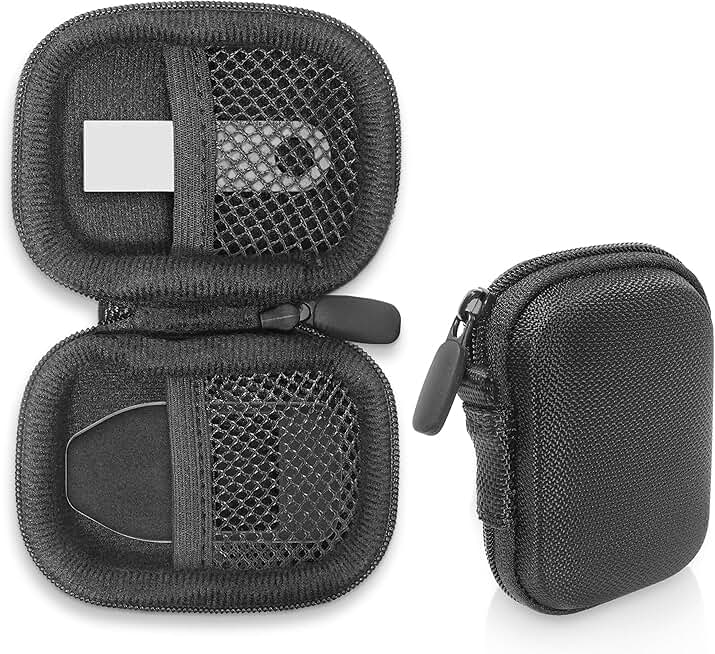


As an Amazon Associate, we may earn from qualifying purchases.
These tools help you manage private keys and ensure your streaming payments remain secure. Choose based on your preferred blockchain and security needs.
What are the 5 layers of DeFi?
Think of the DeFi stack like a building. You need a solid foundation before you can add plumbing, wiring, and finally, the people who live there. Understanding these five layers helps you see where your crypto streams actually move.
1. Settlement Layer
This is the blockchain itself. It’s the ground floor where transactions are permanently recorded. Without this, there is no trustless record of ownership.
2. Asset Layer
Here, tokens are created. This includes native coins like ETH or stablecoins like USDC. These are the actual units of value that flow through the system.
3. Protocol Layer
This is where the money moves. Protocols handle lending, borrowing, and swapping. This is where streaming liquidity typically begins, moving value between wallets.
4. Application Layer
These are the dApps you interact with. Wallets and interfaces live here. You don’t see the code, but you use these tools to send and receive funds.
5. Aggregation Layer
The top floor. Aggregators pull data and liquidity from multiple sources to give you the best rates or most efficient paths for your transactions.
No comments yet. Be the first to share your thoughts!